Major Features // The Property and Flexible-Space Sales Operating System

Start with the decision that needs to improve. Add only the capabilities that help.

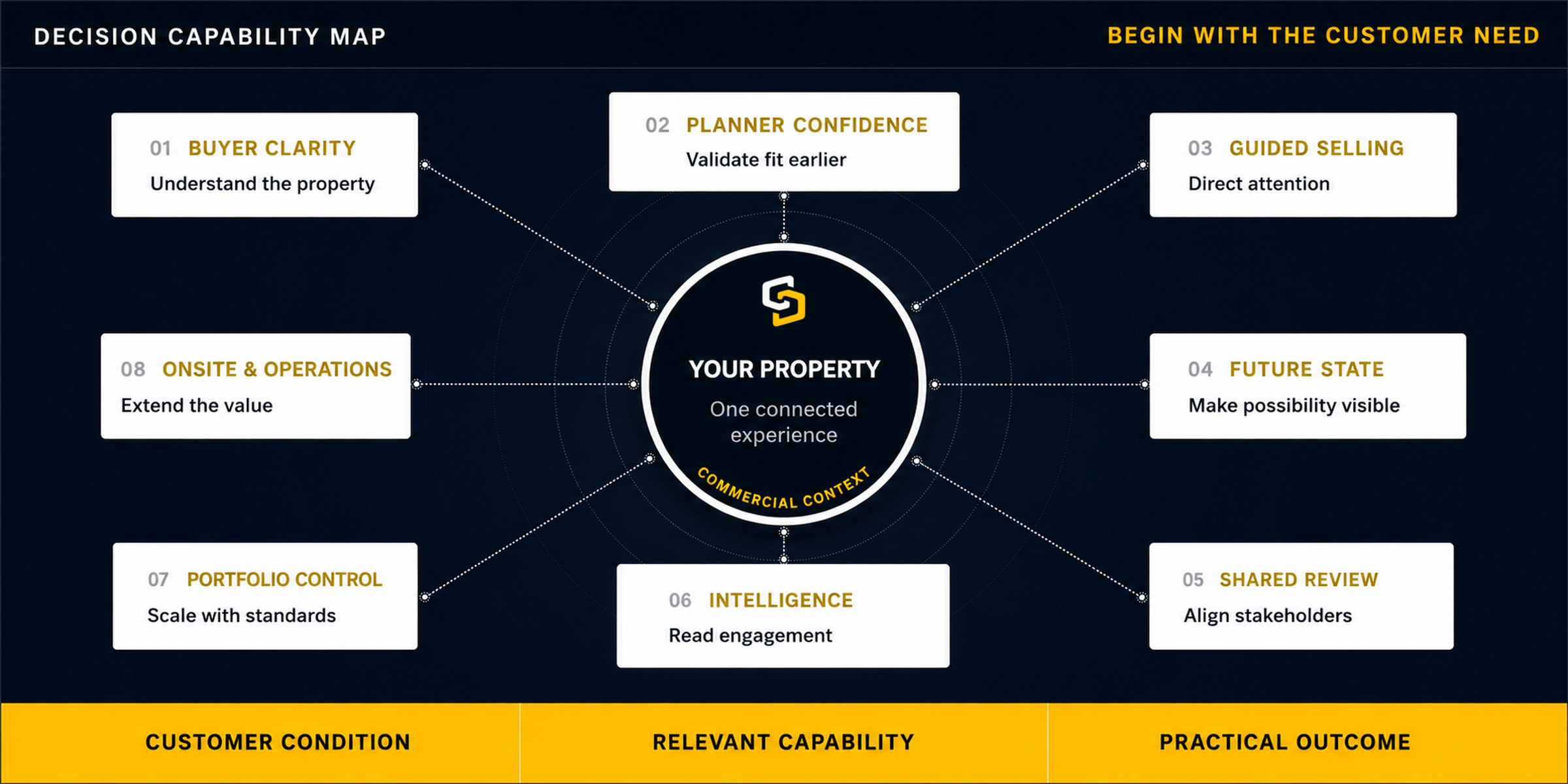
Your buyers may need clearer property context. Your planners may need earlier evidence of fit. Your teams may need a more consistent way to guide, share and measure the opportunity. SiteSee connects the capabilities required for that improvement without forcing every organization to begin in the same place.

UnderstandValidateGuideMeasureExtend
01Identify the gapWhat does the buyer, planner or team still need to understand?
02Connect the capabilityWhich SiteSee function directly improves that condition?
03Prove the changeWhat can the customer now see, do, share or measure?
04Expand intentionallyWhat becomes valuable only after the foundation is working?

Customer Need Before Software Control

A capability earns its place only when it makes a customer decision easier.

A menu is useful when it helps a buyer find the right space. A measurement is useful when it helps a planner test preliminary fit. Analytics are useful when they improve the next conversation. The platform is designed around those customer outcomes, not around the longest possible list of controls.

01

Buyer Experience & Guided Selling

Help buyers understand what photographs leave them to infer.

Your buyers should not have to assemble the property from a gallery, room list, PDF and verbal explanation. A branded SiteSee experience lets them move through the spaces, understand relationships, review supporting information and follow a relevant path toward the next decision.
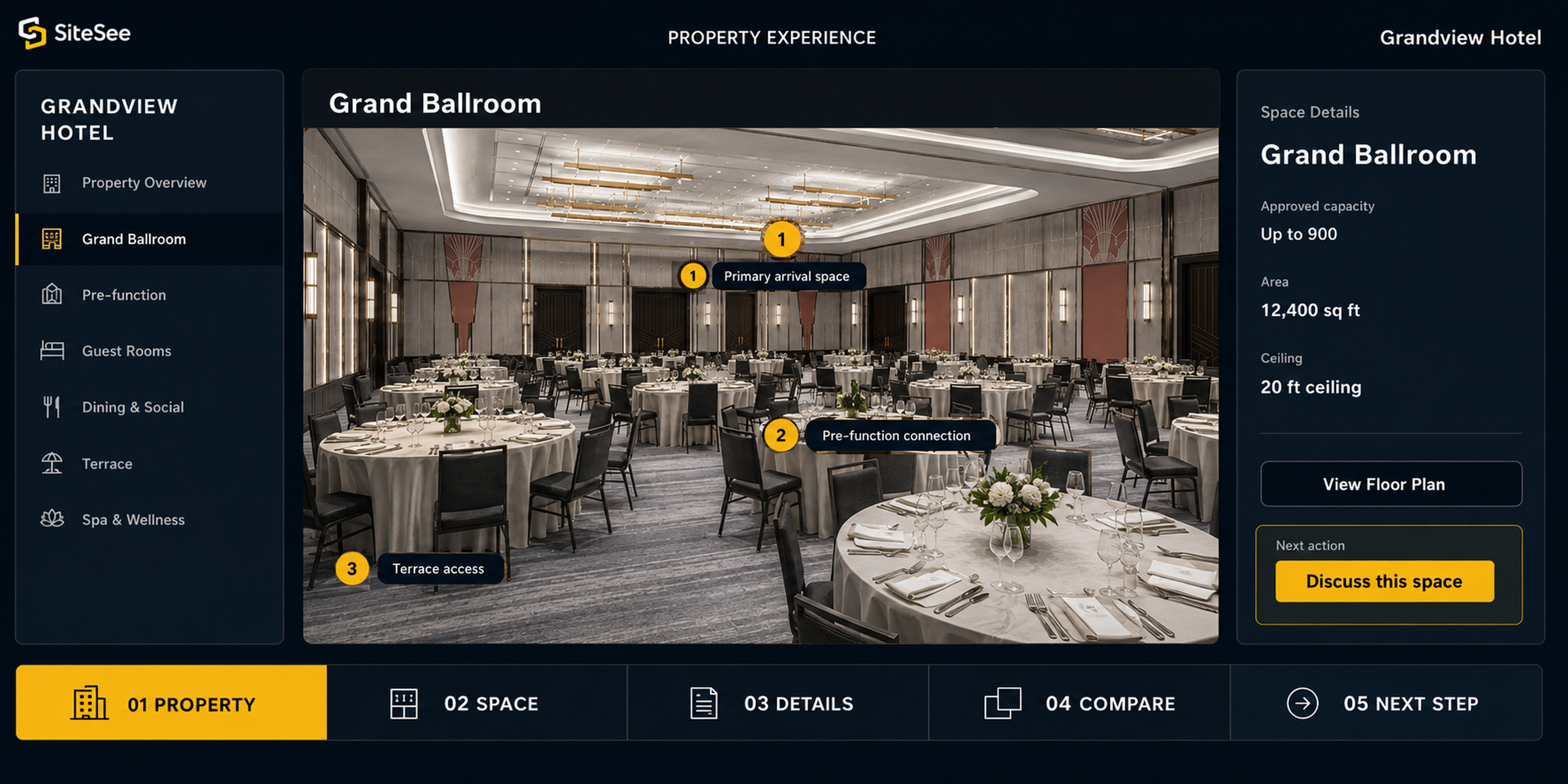
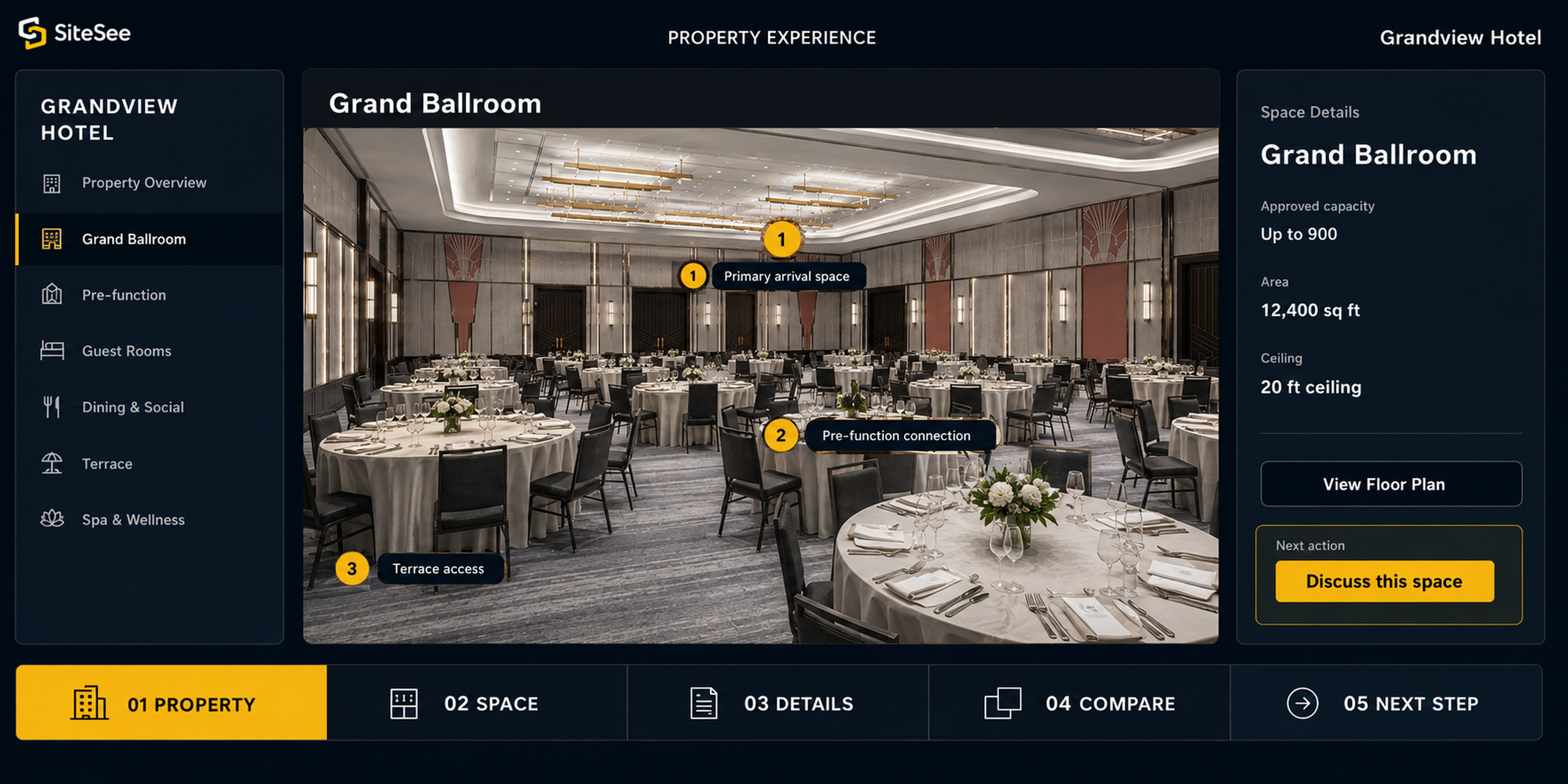
Find what mattersBranded entry, menus, destination categories, highlight reels and direct links.
Understand the spaceRoom-level media, maps, floor plans, property context and connected details.
Guide the reviewAudience-specific pathways, guided flows, virtual explanations and in-context questions.
Advance the opportunityContextual inquiry, contact, RFP and next-step actions after interest has formed.
Customer resultBuyers can return to one consistent property experience instead of relying on memory or repeated explanation.
SiteSee buyer Experience Guided Selling Direct Interface
Buyer Path // Meetings & EventsGrand BallroomLive property context
SiteSee guided-selling property experience interface
01 Property02 Space03 Details04 Compare05 Next Step
What this provesThe property, explanation and action remain connected.
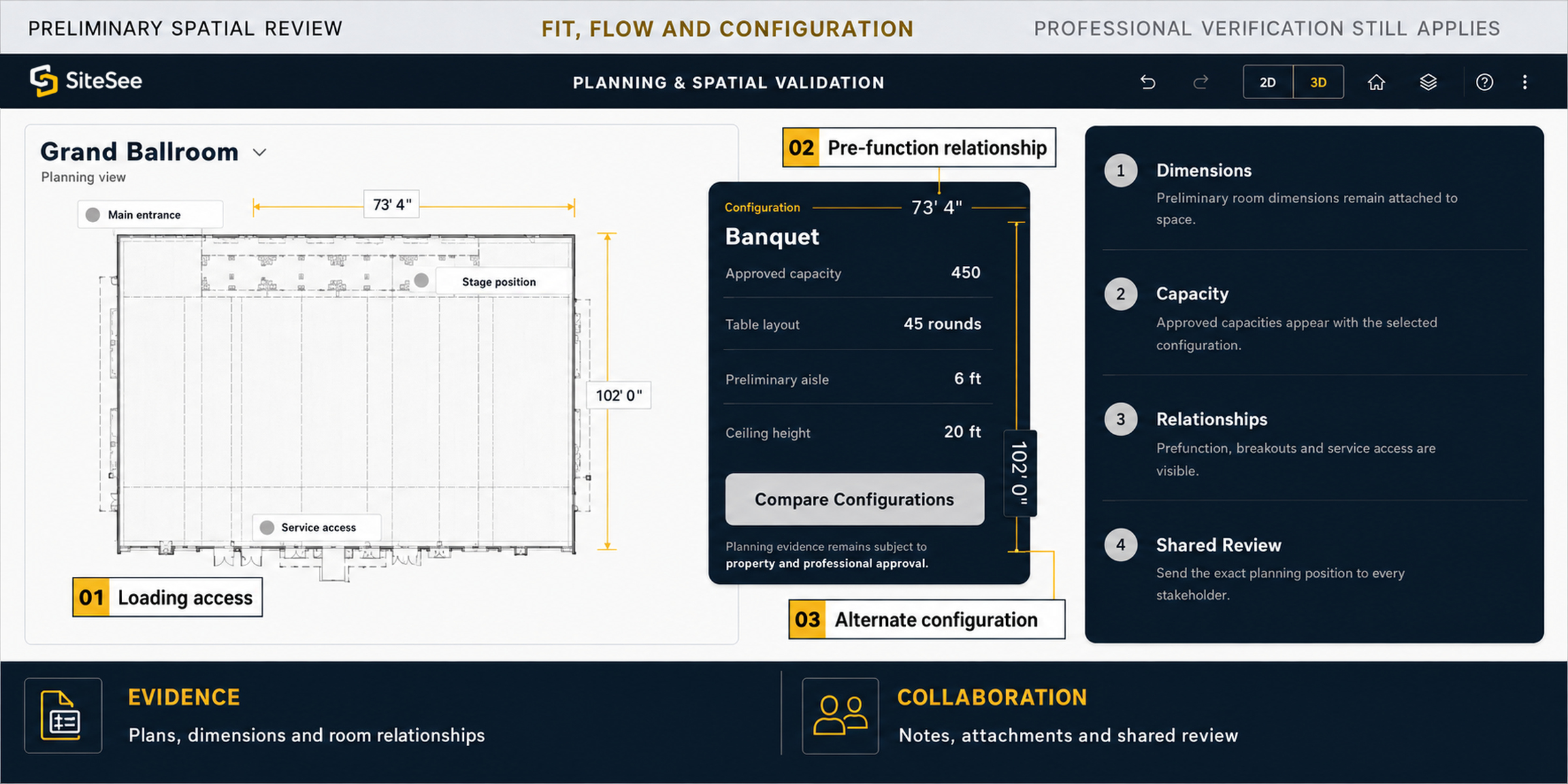
SiteSee planning Spatial Validation Direct Interface
Preliminary Spatial ReviewFit, flow and configurationProfessional verification still applies
SiteSee planning and spatial-validation interface
73' 4"
102' 0"
01Loading access
02Pre-function relationship
03Alternate configuration
EvidencePlans, dimensions and room relationships
CollaborationNotes, attachments and shared review
02

Planning & Spatial Validation

Bring planning questions into the space they describe.

Floor plans and specifications become more useful when they remain connected to the room, route, access point or relationship they explain. SiteSee supports earlier evaluation while preserving the distinction between preliminary review and approved production or life-safety decisions.

Evaluate preliminary fitMeasurements, floor plans, panoramas, maps and exact-location links.
Compare possibilitiesConfiguration examples, virtual staging, alternate layouts and linked planning content.
Resolve questions in contextTags, polygons and spatial notes attached to the precise location.
Control the reviewPrivate access, downloadable material and audience-specific information.
Customer resultPlanners can test assumptions earlier and arrive at the next conversation with more specific questions.
Explore Planning, Configuration & Spatial Validation
03

AI, CGI & Future-State Visualization

Let buyers evaluate what is possible, not only what exists today.

A renovation, event build, seasonal transformation or pre-opening property may not yet exist in the form the buyer needs to evaluate. SiteSee can connect present spatial truth with controlled visual alternatives so decision-makers can review the intended condition before the physical work is complete.
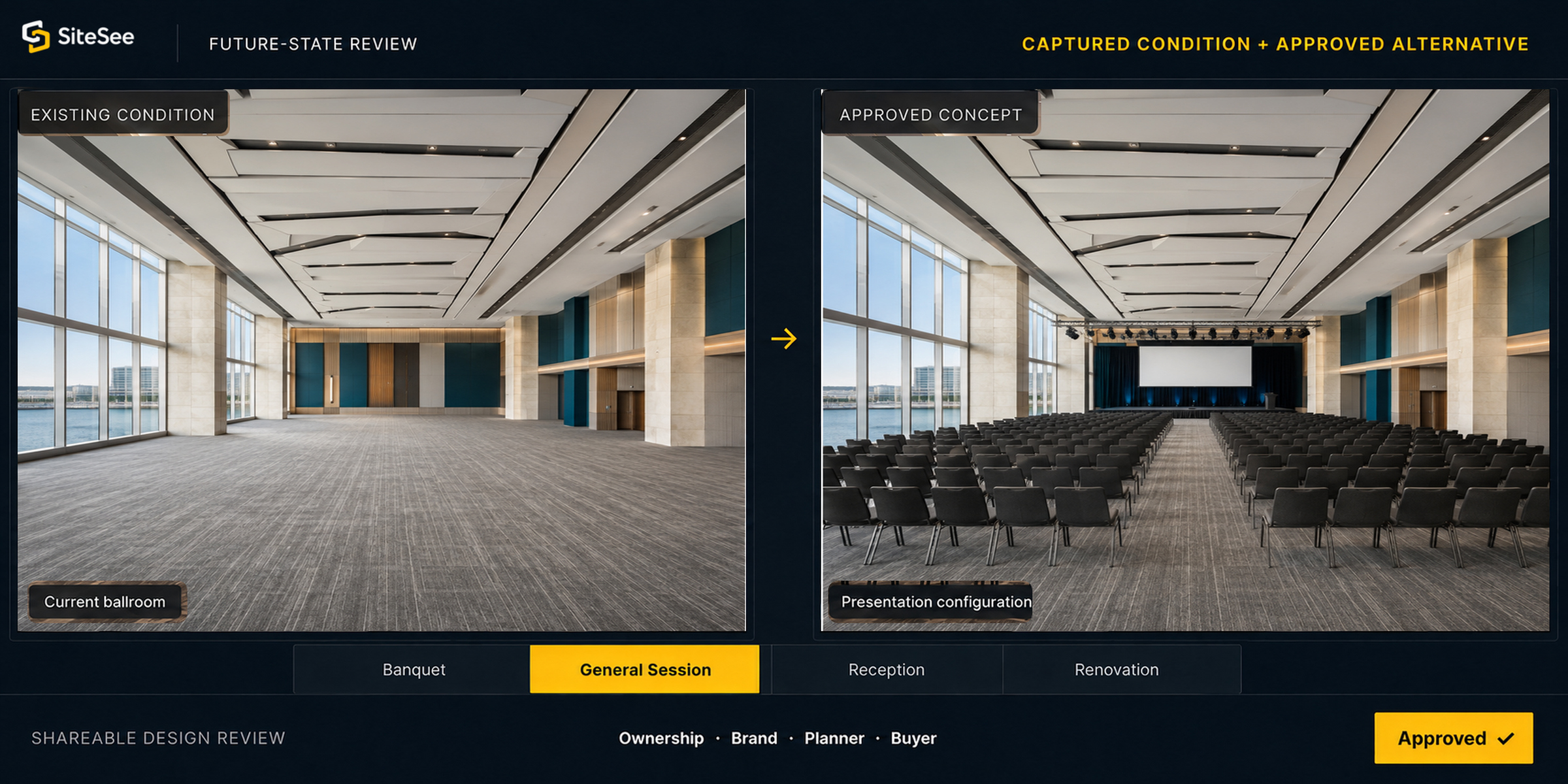
Visualize alternatives2D and 360-degree AI design options for layouts, furnishings and décor.
Show precise conceptsCustom objects, stages, seating, equipment, branded elements and virtual staging.
Sell before completionCGI visualization from plans for pre-opening, renovation and future spaces.
Support approvalShareable concepts for buyers, planners, ownership, brand and internal review.
Customer resultPossibility becomes something stakeholders can examine together rather than a promise they must imagine separately.
Explore AI-Assisted Design & Guided Experiences
SiteSee aI CGI Future State Visualization Direct Interface
Future-State ReviewCaptured condition + approved alternative
Existing condition
Current ballroom
Approved concept
Presentation configuration
BanquetGeneral SessionReceptionRenovation
Shareable design reviewOwnership · Brand · Planner · BuyerApproved ✓
SiteSee content Media Asset Management Direct Interface
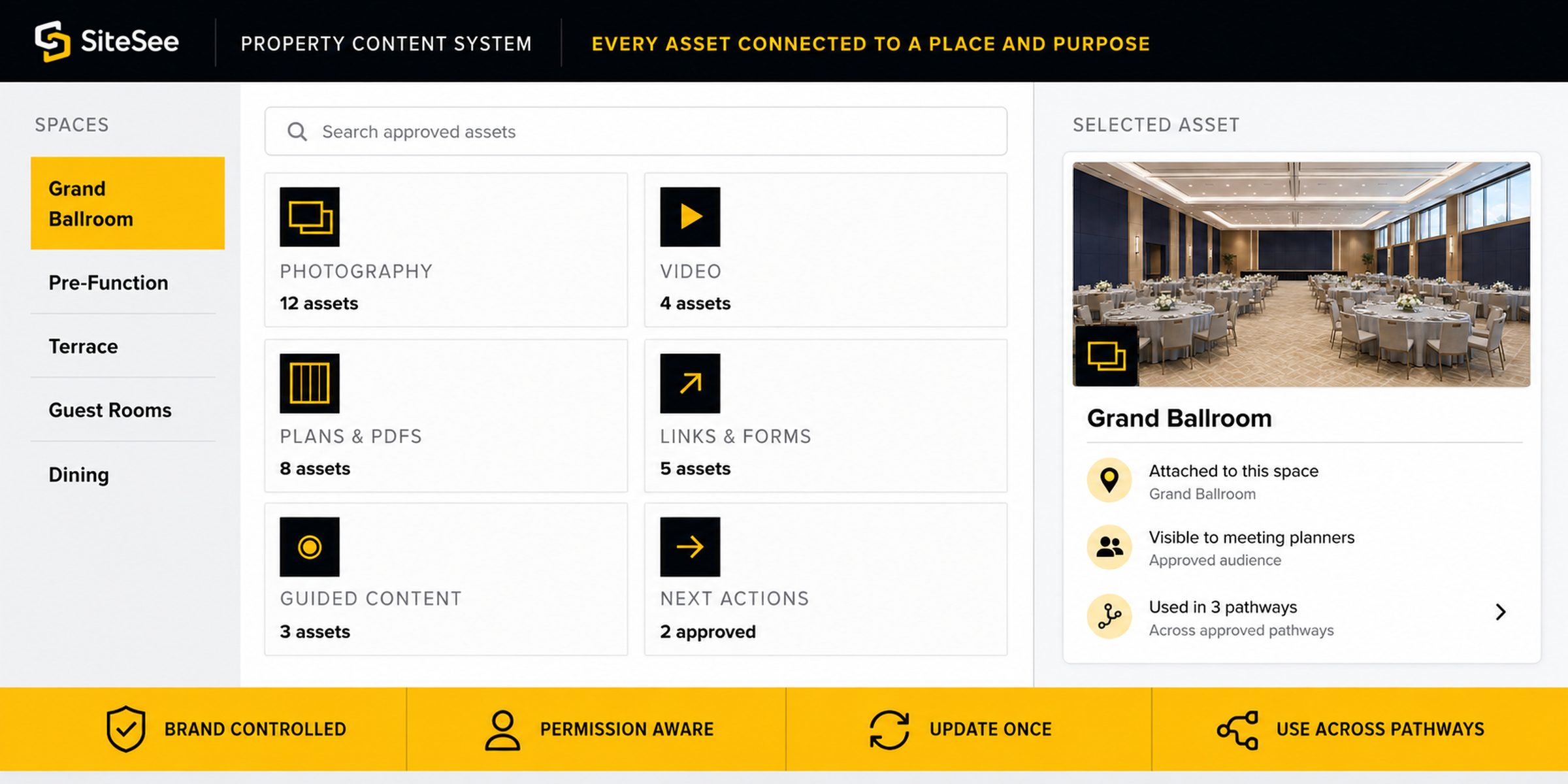
Property Content SystemEvery asset connected to a place and purpose
Photography12 assets
Video4 assets
Plans & PDFs8 assets
Guided Content3 assets
Next Actions2 approved
04

Content, Media & Asset Management

Keep the explanation connected to the place.

Photography, video, documents, links and forms should not become another collection the buyer must search. SiteSee places approved content where it answers a real question and keeps the property team in control of what appears, to whom and for what purpose.

Show atmosphere and servicePhotography, MP4 or Vimeo video, guided human presence and property storytelling.
Explain the practical detailsDocuments, diagrams, menus, AV information, specifications and downloadable files.
Connect external actionsCompatible webpages, forms, booking or RFP tools and approved external links.
Maintain controlBrand profiles, asset organization, visibility rules, access levels and update management.
Customer resultThe buyer receives the right explanation in context without the property rebuilding a separate package for each channel.
05

Collaboration & Live Meetings

Give every stakeholder the same property context.

A decision weakens when the first buyer understands the property but the committee receives only a summary. SiteSee supports controlled sharing and location-specific collaboration so questions, evidence and decisions remain attached to the spaces they concern.
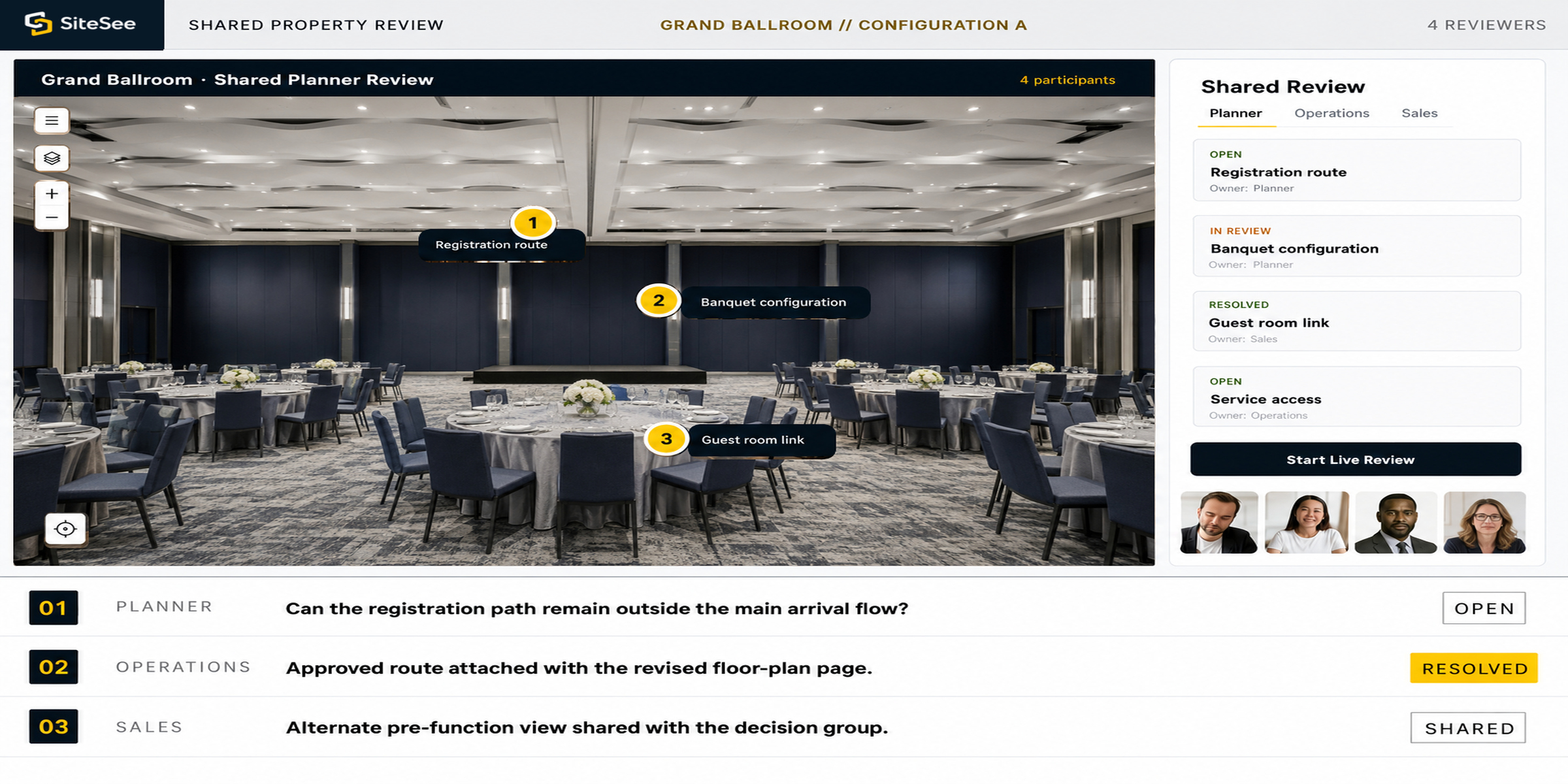
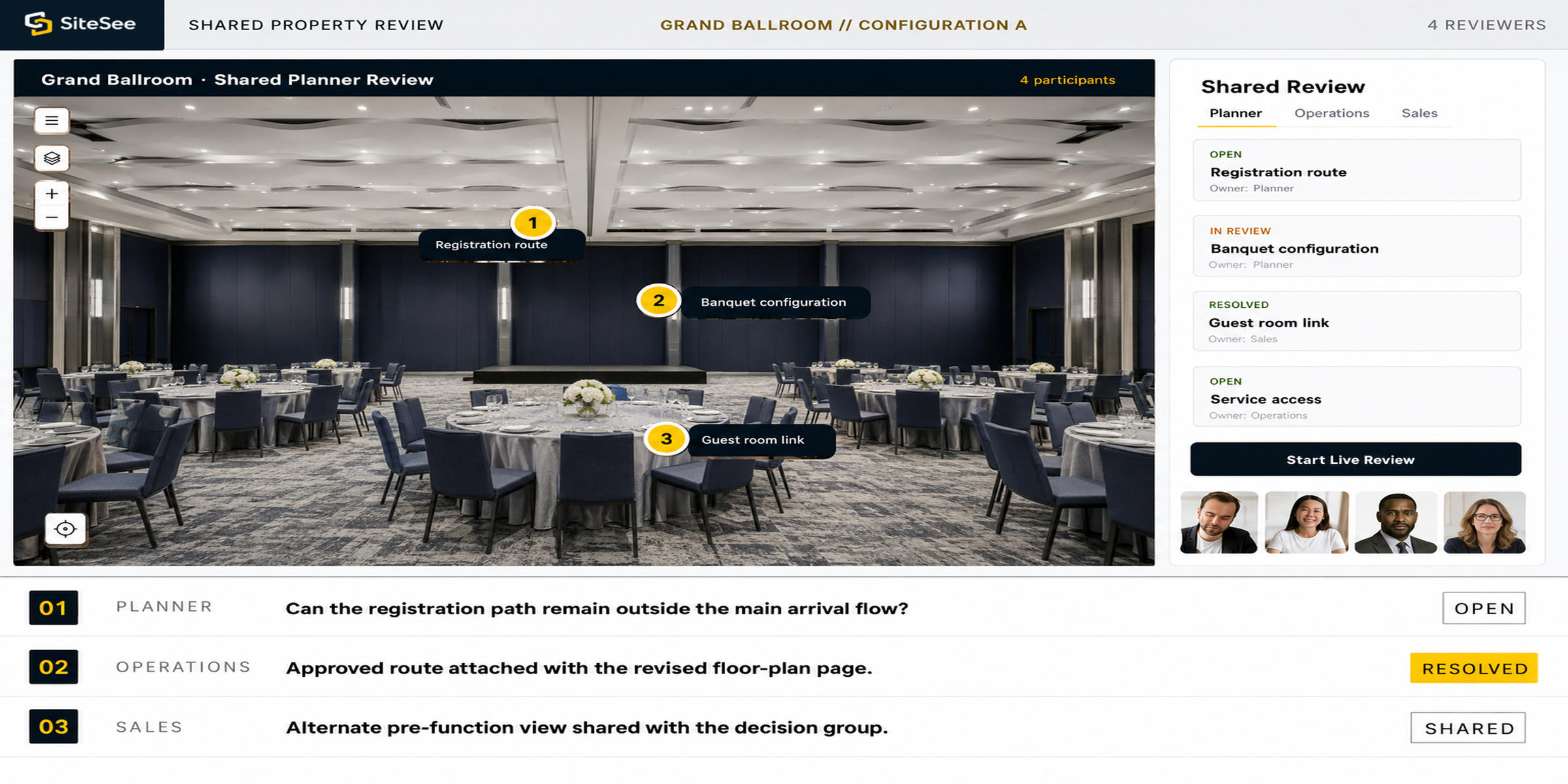
Share with controlStakeholder links, protected planning views and opportunity-specific experience versions.
Discuss the exact locationSpatial notes with approved plans, images, documents and supporting evidence.
Coordinate actionMentions, ownership, open or completed status and a preserved resolution path.
Meet inside the propertyPlan-dependent live review while every participant is looking at the same spatial context.
Customer resultStakeholders can review the same evidence without losing meaning as the opportunity moves from person to person.
Explore Collaboration & Live Meetings
SiteSee collaboration Live Meetings Direct Interface
Shared Property ReviewGrand Ballroom // Configuration A4 reviewers
Shared SiteSee property experience used for stakeholder review123
01
PlannerCan the registration path remain outside the main arrival flow?
Open
02
OperationsApproved route attached with the revised floor-plan page.
Resolved
03
SalesAlternate pre-function view shared with the decision group.
Shared
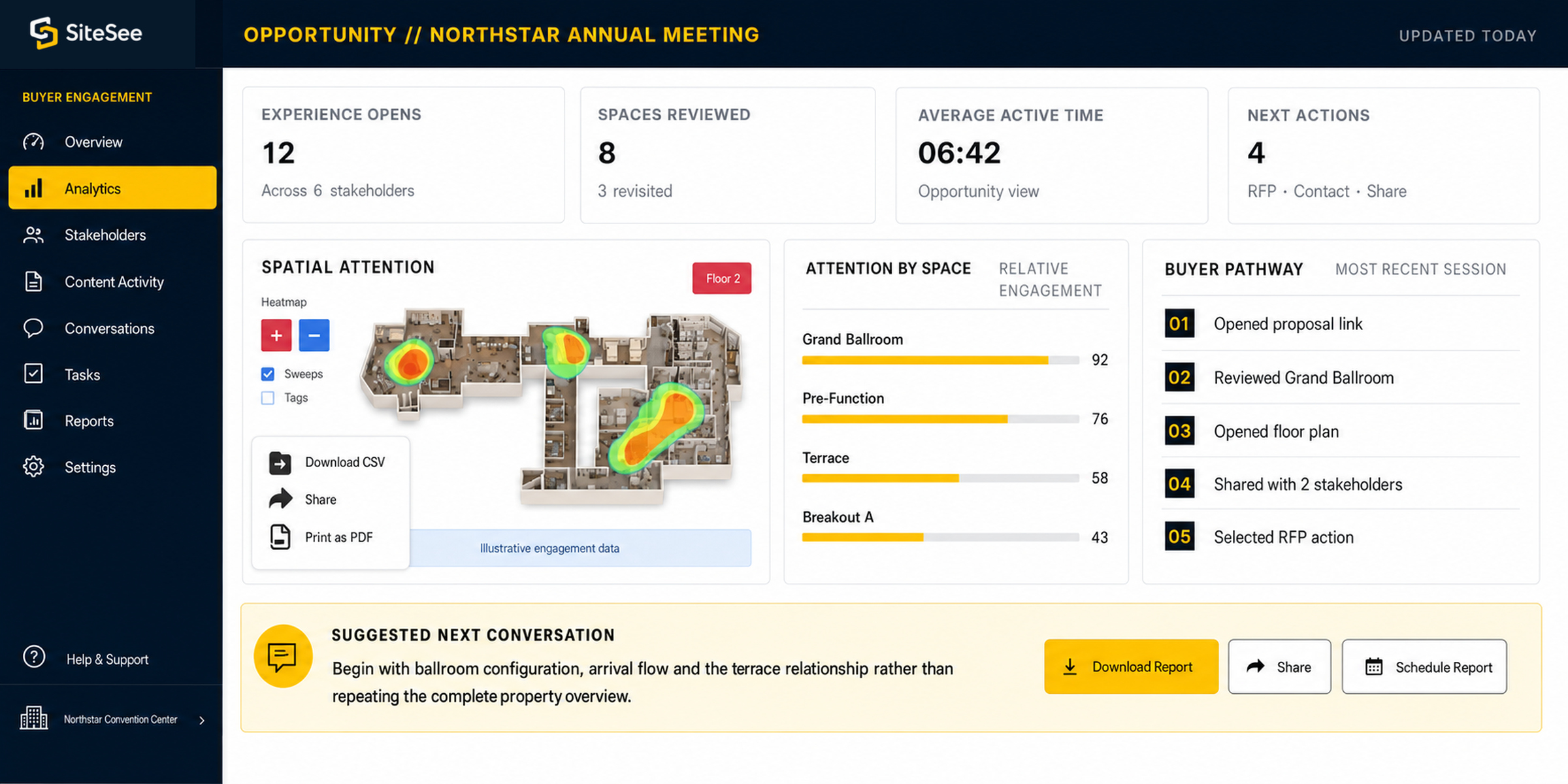
SiteSee analytics Conversion Intelligence Direct Interface
Buyer EngagementOpportunity // Northstar Annual MeetingUpdated today
Experience opens12Across 6 stakeholders
Spaces reviewed83 revisited
Average active time06:42Opportunity view
Next actions4RFP · Contact · Share
Attention by spaceRelative engagement
Grand Ballroom92
Pre-Function76
Terrace58
Breakout A43
Buyer pathwayMost recent session
  1. 01Opened proposal link
  2. 02Reviewed Grand Ballroom
  3. 03Opened floor plan
  4. 04Shared with 2 stakeholders
  5. 05Selected RFP action
Suggested next conversationBegin with ballroom configuration, arrival flow and the terrace relationship rather than repeating the complete property overview.
06

Analytics & Conversion Intelligence

Know what earned attention before the next conversation.

Static collateral may tell you that a file was sent. SiteSee can create a clearer evidence trail around what buyers opened, explored, revisited, shared and acted upon, helping the property respond to demonstrated interest rather than assumptions.

See engagementViews, clicks, interactions, active time, content use and space-level attention.
Understand the pathwayTraffic sources, campaign links, guided-flow completion and shared-experience activity.
Measure intentLead forms, contact actions, calls to action and contextual next-step tracking.
Support leadershipHeat maps, scheduled reports, portfolio reporting and Google Analytics connection.
Customer resultThe next conversation can begin with what the buyer actually explored instead of restarting from the beginning.
Explore Analytics & Buyer Intelligence
07

Portfolio Governance & Distribution

Create consistency without making every property the same.

Management companies, brands and ownership groups need common standards, visibility and control. Individual properties still need their own identity, priorities and buyer pathways. SiteSee separates the standard from the story so both can remain intact.
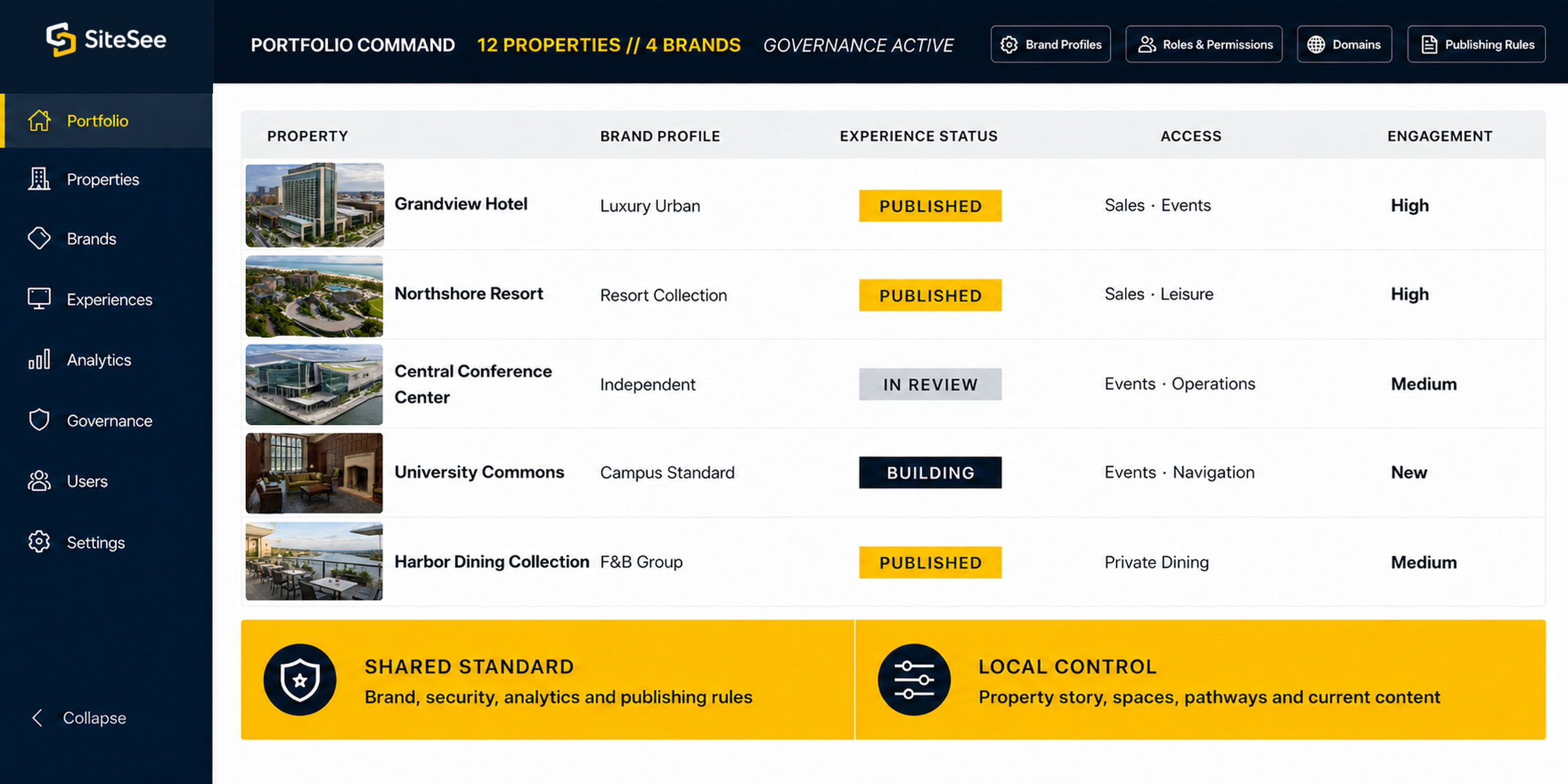
Organize the portfolioSeparate workspaces and projects by property, department, brand or operating company.
Control accessUsers, roles, custom permissions, private experiences and protected information.
Apply standardsBrand profiles, approved presentation rules, white-label options and reusable structures.
Distribute and compareCampaign links, share and embed controls, scheduled reporting and portfolio intelligence.
Customer resultLeadership gains a repeatable operating standard while each property keeps the character and content that make it commercially distinct.
Explore Portfolio Management & Governance
SiteSee portfolio Governance Distribution Direct Interface
Portfolio Command12 Properties // 4 BrandsGovernance active
PropertyBrand profileAccessExperience statusEngagement
Grandview HotelLuxury UrbanPublishedSales · EventsHigh
Northshore ResortResort CollectionPublishedSales · LeisureHigh
Central Conference CenterIndependentIn ReviewEvents · OperationsMedium
University CommonsCampus StandardBuildingEvents · NavigationNew
Harbor Dining CollectionF&B GroupPublishedPrivate DiningMedium
Shared standardBrand, security, analytics and publishing rules
Local controlProperty story, spaces, pathways and current content
SiteSee onsite Navigation Operational Guidance Direct Interface
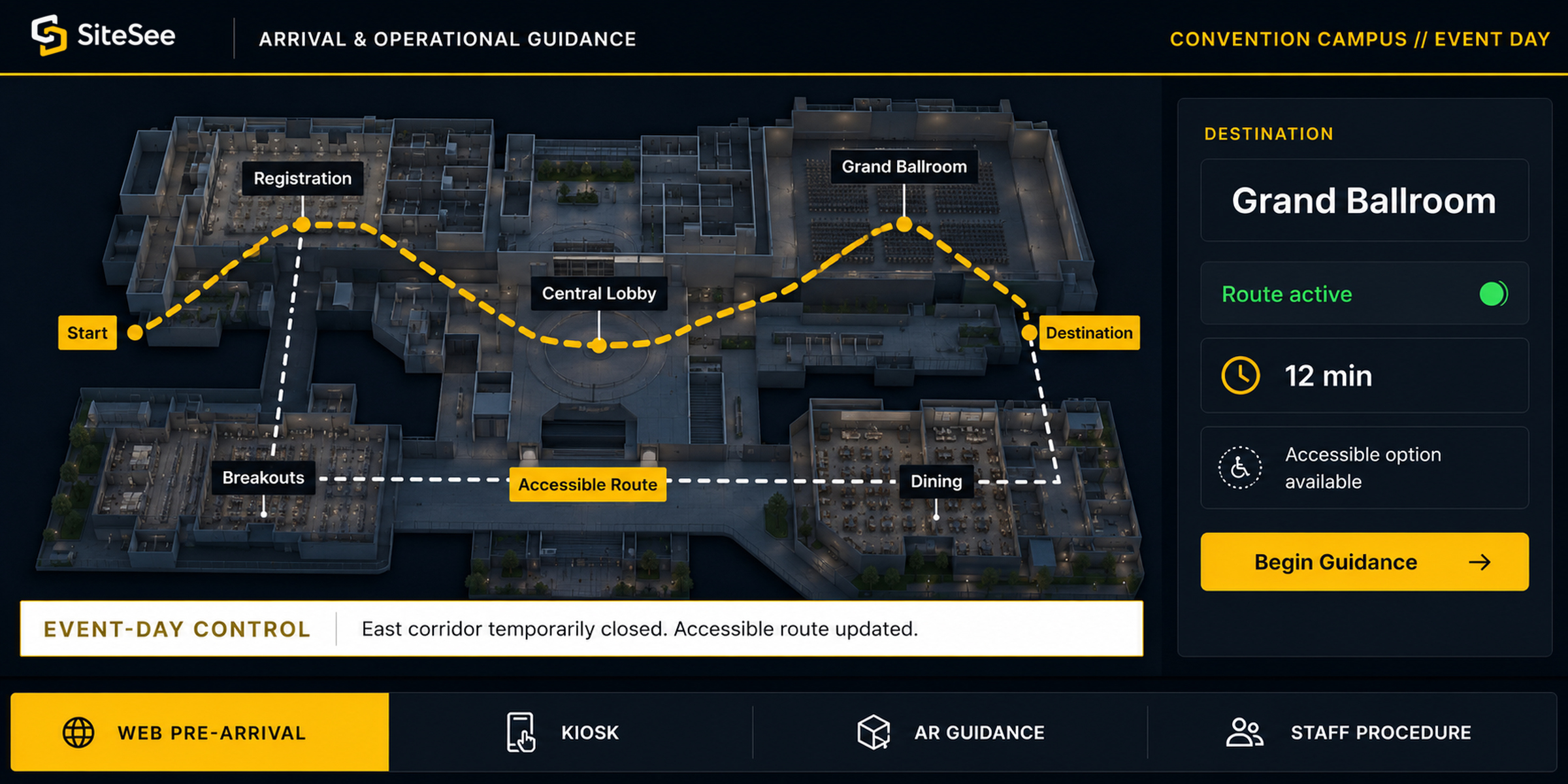
Arrival & Operational GuidanceConvention Campus // Event Day
RegistrationGrand BallroomBreakoutsDiningCentral Lobby StartAccessible RouteDestination
Event-day controlEast corridor temporarily closed. Accessible route updated.
Web Pre-ArrivalKioskAR GuidanceStaff Procedure
08

Onsite Navigation & Operational Guidance

Extend the experience from selling into arrival and operation.

The same spatial foundation that helps a buyer evaluate the property can support people after the decision. Appropriate deployments may guide guests, attendees, exhibitors, vendors and staff through complex buildings or place operational knowledge where work actually occurs.

Prepare arrivalDestination search, web route planning and clear property or campus orientation.
Guide people onsiteKiosk navigation, augmented guidance, accessible route choices and event-day route controls.
Support staff in contextOperational notes, guided procedures, attachments and augmented knowledge overlays.
Connect complex environmentsBranded interfaces, IoT, APIs and security connections where the operating need justifies them.
Customer resultThe platform can continue reducing spatial uncertainty after the sale, while higher-complexity operational uses are scoped only where they create real value.
Explore Onsite Navigation & Operational Guidance

Start Where the Value Is Clearest

You do not have to activate every capability at once.

The strongest deployment begins with the customer decision that matters now, proves usefulness in that environment, and expands only when the next layer solves a real problem.

Foundation01

Buyer Clarity

Property experience, navigation, content, plans, links and contextual next actions.

Immediate sales value
Expansion02

Planner Confidence

Measurements, configurations, AI alternatives, spatial notes and controlled planning content.

Earlier fit evaluation
Expansion03

Guided Selling & Intelligence

Audience pathways, guided flows, buyer engagement and opportunity-level insight.

More relevant follow-up
Scale04

Portfolio Governance

Workspaces, brand standards, permissions, distribution and multi-property reporting.

Repeatable control
Advanced05

Onsite & Operations

Navigation, augmented guidance, procedures and scoped system connections.

Use only where justified

Capability Scope & Accuracy

Know what is ready now, what can be configured and what deserves a separate scope.

Feature availability can vary by plan, account configuration, add-on allocation, integration requirements and enterprise scope. SiteSee confirms the active requirement and implementation path before a capability becomes part of the customer commitment.

Discuss the right scope for your property
CoreFoundational platform capabilityUsed in the standard property experience where applicable.
Plan FeatureAvailable by plan or workspaceConfirmed against the active account and intended use.
Add-OnSeparately activated capabilityScoped where additional production, credits or deployment are required.
Enterprise / CustomConfigured or developed for the environmentApplies to governance, integrations, white label and specialized workflows.
Verification RequiredDemonstrate before promisingUsed where current documentation, third-party policy or account behavior must be confirmed.

Full Feature Library

See the major outcomes first. Explore the complete capability library when your decision requires more detail.

Search 129 documented capabilities and subfeatures by customer objective, team, property type, deployment scope, availability and platform category. The library functions as a reference, not as the opening sales story.

Open the Full Feature Library
Full Feature LibrarySearch and filter by the work you need to accomplish
Customer objectiveBuyer clarityPlanningGuided sellingAnalyticsOnsite
TeamSalesMarketingEventsOperationsLeadership
AvailabilityCorePlanAdd-OnEnterpriseVerify
Now availableFull Feature Library129 documented records organized around customer outcomes, scope and availability.

Choose Relevance Over Feature Volume

The right Sales OS is the one your team can use to improve the decisions that matter.

Begin with the property, buyer journey or operating condition you need to improve. SiteSee can then connect the capabilities that support that result and leave the rest out until it becomes useful.